AI & Machine Learning
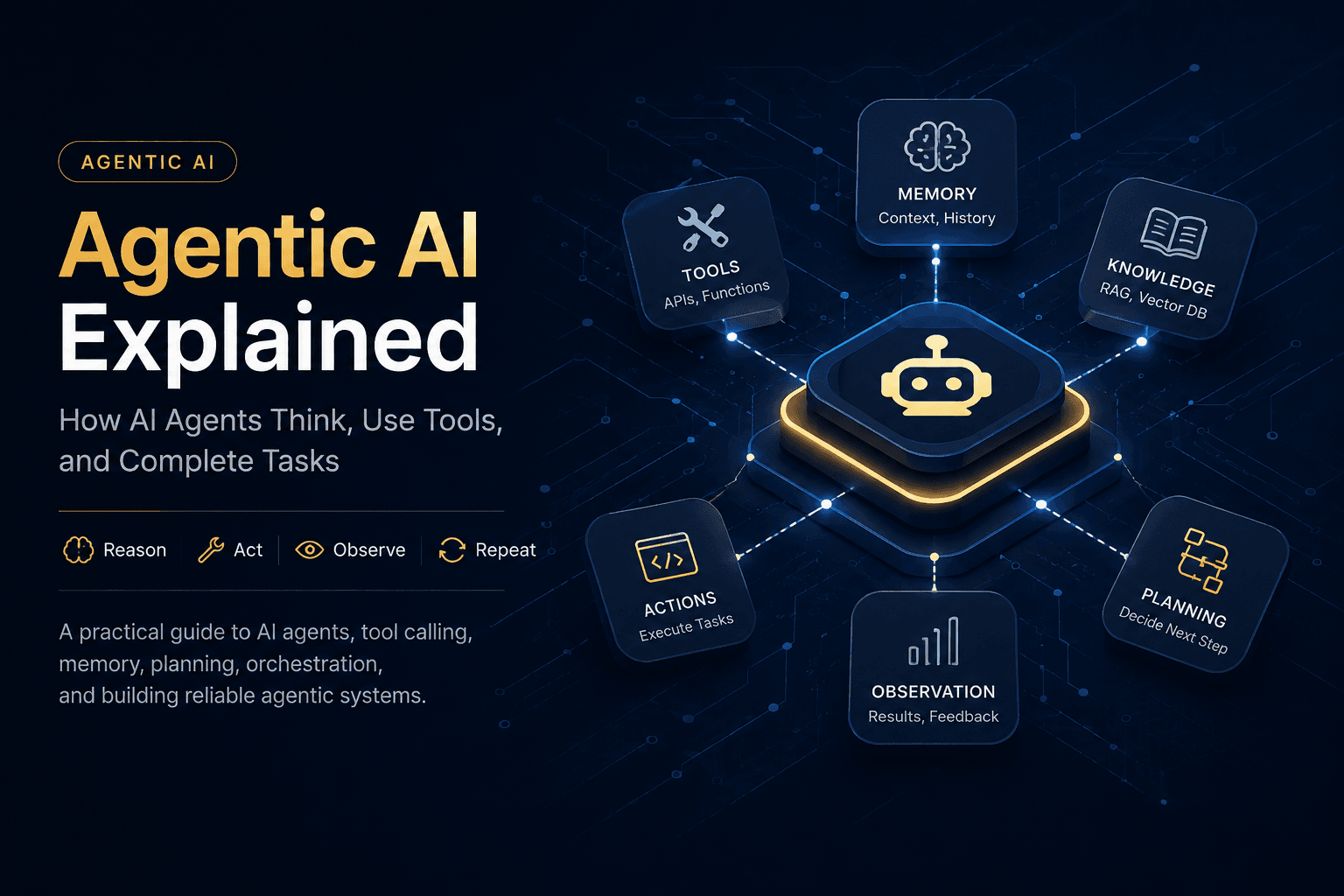
Agentic AI Explained: How AI Agents Think, Use Tools, and Complete Tasks
A practical guide to Agentic AI, covering agents, tool calling, memory, planning, orchestration, LangGraph, reliability, and the architecture behind production AI systems.
 AI & ML / field notes
Agentic AI Explained: How AI Agents Think, Use Tools, and Complete Tasks
Large language models changed the way software can interact with information.
A traditional application usually follows a predefined path:
User
↓
Input
↓
Business Logic
↓
Database / API
↓
Response
The software knows what to do before the user asks.
But many real-world tasks are not that predictable.
A user might ask:
"Find the best way to travel from Bilaspur to Delhi next Friday, compare the available options, check the constraints, and recommend what I should book."
That is not a single database query.
It may require:
understanding the user's intent
searching external information
calling multiple tools
maintaining context
comparing results
handling failures
making decisions
and producing a final recommendation
This is where Agentic AI becomes interesting.
Instead of using an LLM only to generate a response, an agentic system gives the model access to tools, state, decision-making loops, and controlled actions.
The model becomes one part of a larger software system.
Agentic AI is not simply a smarter chatbot.
It is an architectural approach for building AI systems that can work toward a goal, decide what actions are required, use available tools, observe the results, and continue until the task reaches a useful stopping condition.
What Is Agentic AI?
At a high level, an agentic system looks like this:
┌──────────────┐
│ User │
└──────┬───────┘
│
▼
┌─────────────────┐
│ AI Agent │
│ │
│ Reason / Decide │
└───────┬─────────┘
│
┌───────────┼───────────┐
│ │ │
▼ ▼ ▼
Search Database API
Tool Tool Tool
│ │ │
└───────────┼───────────┘
│
▼
Tool Results
│
▼
┌─────────────────┐
│ Observe Results │
│ Update State │
└───────┬─────────┘
│
▼
Next Action
│
└──────► ...
The important part is the loop.
A basic LLM application might look like:
Prompt → Model → Answer
An agentic application can look like:
Goal
↓
Reason
↓
Choose tool
↓
Execute tool
↓
Observe result
↓
Update state
↓
Reason again
↓
Choose another tool
↓
...
↓
Final answer
The system is therefore not simply generating text.
It is participating in a controlled execution process.
Agentic AI vs Traditional Chatbots
This distinction is one of the easiest ways to understand Agentic AI.
Traditional chatbot
A simple chatbot generally follows:
User message
↓
LLM
↓
Text response
This can still be extremely useful.
But its capabilities are largely determined by the model and the context supplied to it.
Tool-using agent
An agent can instead operate like this:
User
↓
LLM
↓
"Do I need external information?"
↓
YES
↓
Call search tool
↓
Receive result
↓
Reason about result
↓
Call another tool
↓
Receive result
↓
Final response
The important difference is action.
A chatbot primarily responds.
An agent can act toward a goal.
Agentic AI vs RAG
RAG — Retrieval-Augmented Generation — is another concept that is often confused with Agentic AI.
A basic RAG system looks like:
User Question
↓
Embedding / Search
↓
Relevant Documents
↓
LLM
↓
Answer
RAG is excellent when the main problem is:
"Find the right information and use it to answer the question."
Agentic systems become useful when the problem is closer to:
"Figure out what needs to happen, use several capabilities, make decisions between steps, and complete the task."
The two are not competitors.
They can work together.
AI Agent
│
┌───────────┼───────────┐
│ │ │
▼ ▼ ▼
RAG Search API
Retrieval Tool Tool
│ │ │
└───────────┼───────────┘
▼
Results
│
▼
Final Task
A production agent might use a RAG system as one of its tools.
The distinction is simple:
RAG retrieves knowledge. An agent decides how and when to use capabilities.
The Core Agent Loop
Many agentic systems can be understood through four basic stages:
REASON
↓
ACT
↓
OBSERVE
↓
REASON AGAIN
Let's break them down.
1. Reason
The model receives the current state and determines what should happen next.
For example:
Goal:
Find the cheapest suitable train.
Current information:
- Origin known
- Destination known
- Date known
- Available train data not yet retrieved
Decision:
Call the train search tool.
The model is deciding what action is necessary based on the current state.
2. Act
The agent invokes a tool.
For example:
search_trains(
origin="Bilaspur",
destination="Delhi",
date="2026-08-21"
)
The model does not necessarily execute the underlying operation itself.
Instead, the application exposes a controlled tool interface.
3. Observe
The tool returns information.
For example:
{
"trains": [
{
"name": "Example Express",
"departure": "18:30",
"arrival": "11:20",
"availability": "RAC"
}
]
}
The agent receives that information as part of its execution state.
4. Reason Again
The model now has new information.
It can decide whether it needs:
another search
availability information
price comparison
clarification from the user
or no additional tool call
Eventually:
Goal completed
↓
Final response
This loop is the foundation of many agentic architectures.
The Anatomy of an AI Agent
A useful mental model is to think of an agent as several cooperating components.
┌─────────────────────┐
│ Agent │
└──────────┬──────────┘
│
┌────────────────────┼────────────────────┐
│ │ │
▼ ▼ ▼
Model Tools Memory
│ │ │
└──────────────┬─────┴──────────────┬─────┘
│ │
▼ ▼
Planning State
│ │
└─────────┬──────────┘
▼
Orchestration
│
▼
Final result
The exact architecture varies from system to system, but these concepts appear repeatedly.
1. The Model
The model is the reasoning engine.
It interprets:
the user's goal
available context
previous tool results
tool descriptions
current state
But the model alone is not the entire agent.
Think of the LLM as the decision-making component, not the complete application.
This distinction becomes increasingly important as systems move from prototypes to production.
2. Tools
Tools allow an agent to interact with the outside world.
Examples include:
Search
Database queries
Weather APIs
Payment systems
File systems
Code execution
Email
Calendar
Web browsers
Internal APIs
Vector databases
A tool should have a clear contract.
For example:
def get_weather(city: str) -> dict:
...
The model does not need to understand the internal implementation.
It needs to understand:
Tool:
get_weather
Input:
city
Output:
weather information
This separation is important for reliability and security.
Building a Simple Tool-Using Agent
Let's build a deliberately small example.
We will create two tools:
a calculator
a weather lookup
The purpose here is to demonstrate the architecture, not to build a production weather service.
from typing import Callable
def calculator(expression: str) -> str:
"""Calculate a simple arithmetic expression."""
try:
return str(eval(expression, {"__builtins__": {}}, {}))
except Exception:
return "Invalid calculation"
def get_weather(city: str) -> str:
"""Return weather information for a city."""
# A production implementation would call a real weather API.
return f"The weather in {city} is currently sunny."
TOOLS: dict[str, Callable] = {
"calculator": calculator,
"get_weather": get_weather,
}
Security note: eval() is intentionally used here only to keep the conceptual example short. It should not be used for arbitrary user-controlled expressions in a production application. A safe expression parser or dedicated calculation service is a better choice.
Now imagine the user asks:
What is 125 * 48?
The model can decide that the calculator tool is appropriate.
It might produce a structured tool request such as:
{
"tool": "calculator",
"arguments": {
"expression": "125 * 48"
}
}
The application executes the tool:
tool_name = "calculator"
arguments = {
"expression": "125 * 48"
}
result = TOOLS[tool_name](**arguments)
print(result)
Output:
6000
The result is then returned to the model, which can use the observation to produce the final response.
That is the basic pattern behind tool-using agents.
Why Tools Need Boundaries
Giving an AI system tools does not automatically make it safe.
In fact, tools make security even more important.
Imagine an agent with these capabilities:
read_database()
send_email()
delete_file()
issue_refund()
execute_code()
A poorly designed system could cause serious damage.
Production agents therefore need boundaries:
Agent
│
├── Allowed tools
│
├── Input validation
│
├── Permission checks
│
├── Rate limits
│
├── Timeouts
│
├── Human approval
│
└── Audit logs
An agent should not be trusted simply because it is powered by a capable model.
Memory
A useful agent often needs memory.
But "memory" can mean several different things.
Short-Term Memory
Short-term memory represents the current conversation or execution state.
User message
↓
Tool result
↓
Model decision
↓
Another tool result
↓
Current response
The agent needs this information while completing the task.
Long-Term Memory
Long-term memory can contain information that should persist across sessions.
For example:
User preferences
Past decisions
Project information
Saved instructions
Previous tasks
This usually requires persistent storage.
Possible technologies include:
PostgreSQL
Redis
Vector databases
Document stores
The important architectural principle is:
Memory should be designed around the application's requirements rather than added simply because an agent "needs memory."
Not every agent requires long-term memory.
Planning
Some tasks can be completed in one or two tool calls.
Others require a sequence.
For example:
Research three AI frameworks, compare their documentation, evaluate their GitHub activity, and recommend one.
A possible plan is:
1. Search framework A
2. Search framework B
3. Search framework C
4. Compare results
5. Evaluate criteria
6. Produce recommendation
Planning can be explicit or implicit.
Explicit planning
Goal
↓
Create plan
↓
Execute step 1
↓
Execute step 2
↓
Execute step 3
↓
Review
↓
Answer
Iterative planning
Goal
↓
Choose next action
↓
Observe result
↓
Choose next action
↓
Observe result
↓
Finish
Neither approach is universally better.
The right architecture depends on the task.
Orchestration
This is where agentic systems become software architecture rather than just prompting.
Orchestration controls:
what runs
when it runs
what state is available
which tools can be used
what happens after failures
when execution stops
whether human approval is required
A simple orchestration graph might look like:
START
│
▼
Understand Goal
│
▼
Need a Tool?
/ \
YES NO
│ │
▼ ▼
Execute Tool Final Answer
│
▼
Observe
│
▼
Continue?
/ \
YES NO
│ │
└───┐ ▼
│ END
▼
Reason
As workflows become more complicated, explicit orchestration becomes increasingly valuable.
Where LangGraph Fits
LangGraph provides graph-based orchestration for stateful agent workflows.
Instead of hiding the entire workflow behind one abstraction, you can explicitly model:
state
nodes
edges
conditional routing
persistence
execution behavior
A simplified architecture looks like:
┌──────────────┐
│ START │
└──────┬───────┘
▼
┌──────────────┐
│ LLM Node │
└──────┬───────┘
│
Tool call?
/ \
YES NO
│ │
▼ ▼
┌──────────┐ ┌─────────┐
│ ToolNode │ │ END │
└────┬─────┘ └─────────┘
│
▼
Tool result
│
└──────────────► LLM
The graph makes the execution flow explicit.
A Small LangGraph Agent
Here is a simplified Python example.
from langchain.chat_models import init_chat_model
from langchain.tools import tool
from langgraph.graph import (
StateGraph,
MessagesState,
START,
)
from langgraph.prebuilt import (
ToolNode,
tools_condition,
)
model = init_chat_model(
"openai:gpt-5.4",
temperature=0,
)
@tool
def calculate(expression: str) -> str:
"""Calculate a simple arithmetic expression."""
# Production systems should use a safe expression parser.
return str(eval(expression, {"__builtins__": {}}, {}))
tools = [calculate]
model_with_tools = model.bind_tools(tools)
def call_model(state: MessagesState):
"""Ask the model what to do next."""
response = model_with_tools.invoke(
state["messages"]
)
return {
"messages": [response]
}
builder = StateGraph(MessagesState)
builder.add_node(
"model",
call_model,
)
builder.add_node(
"tools",
ToolNode(tools),
)
builder.add_edge(
START,
"model",
)
builder.add_conditional_edges(
"model",
tools_condition,
)
builder.add_edge(
"tools",
"model",
)
agent = builder.compile()
The important part is the graph:
START
↓
MODEL
↓
Does it request a tool?
│
├── No ───────→ END
│
└── Yes
↓
TOOLS
↓
MODEL
↓
...
The loop allows the model to receive tool results and decide what should happen next.
The exact model configuration and APIs can change over time, so production implementations should always be checked against the current framework documentation.
Why Graphs Matter
You could implement an agent loop manually.
But as the system grows, the workflow becomes harder to reason about.
Imagine this:
┌─────────────┐
│ Router │
└──────┬──────┘
│
┌────────────┼────────────┐
▼ ▼ ▼
Research Coding Planning
│ │ │
▼ ▼ ▼
Search Tests Tools
│ │ │
└────────────┼────────────┘
▼
Reviewer
│
┌─────┴─────┐
▼ ▼
Approve Retry
│ │
▼ └──────► ...
Final
At this point, you're no longer writing a chatbot.
You're designing an execution system.
That is where explicit orchestration becomes useful.
Single Agent vs Multi-Agent
Another popular concept is the multi-agent architecture.
For example:
Supervisor
│
┌────────────┼────────────┐
▼ ▼ ▼
Researcher Coder Reviewer
│ │ │
└────────────┼────────────┘
▼
Result
This can be useful.
But there is a common mistake:
Adding more agents does not automatically make a system better.
If one model with three tools can solve the problem reliably, creating five agents may simply add:
latency
cost
complexity
debugging difficulty
state-management problems
Start with the simplest architecture that satisfies the requirements.
Move to multiple agents when there is a clear reason.
Agentic AI Does Not Mean Unlimited Autonomy
The word "agent" can make systems sound more autonomous than they actually are.
Production systems should define boundaries.
For example:
LOW RISK
Search web
Read documents
Calculate values
Summarize information
↓
MEDIUM RISK
Create draft
Modify internal records
Open pull request
↓
HIGH RISK
Send money
Delete data
Send external communication
Change production infrastructure
The higher the consequence of an action, the more control the system should have around it.
A useful pattern is human-in-the-loop:
Agent proposes action
↓
Risk check
↓
Human approval required?
/ \
YES NO
│ │
▼ ▼
Human Execute
approval
│
▼
Execute
This is especially important for financial, administrative, security, and production operations.
Guardrails
Guardrails should exist at multiple levels.
Input Guardrails
Check what enters the system.
User input
↓
Validation
↓
Allowed?
↓
Agent
Tool Guardrails
Check what the agent is allowed to execute.
ALLOWED_TOOLS = {
"search",
"calculator",
"get_weather",
}
def is_tool_allowed(tool_name: str) -> bool:
return tool_name in ALLOWED_TOOLS
A tool outside the allowed set should never execute.
Output Guardrails
Check what leaves the system.
Agent output
↓
Validation
↓
Policy check
↓
Final response
Operational Guardrails
Production systems should also consider:
Timeouts
Retries
Rate limits
Maximum iterations
Maximum token budgets
Permission checks
Audit logging
Human approval
An agent that can continue forever is not a production system.
The Importance of Stop Conditions
Every agent needs a reason to stop.
For example:
STOP when:
✓ Task completed
✓ Final answer generated
✓ Maximum iterations reached
✓ Tool failure cannot be recovered
✓ Human approval denied
✓ Timeout reached
✓ Budget exceeded
A simple limit might look like:
MAX_STEPS = 10
if step_count >= MAX_STEPS:
return {
"status": "stopped",
"reason": "maximum_steps_reached",
}
The exact implementation depends on the framework, but the principle is universal.
Autonomy without boundaries is uncontrolled execution.
Reliability Is More Important Than Intelligence
A common mistake when building agents is focusing only on the model.
People often ask:
Which model should I use?
That matters.
But production reliability also depends on:
Model
+
Tools
+
State
+
Orchestration
+
Validation
+
Observability
+
Evaluation
+
Failure handling
A slightly weaker model inside a well-designed system can outperform a more capable model inside a badly designed one.
Handling Tool Failures
Tools fail.
APIs go down.
Databases timeout.
External services change.
A robust agent should expect failure.
Instead of:
Tool failed
↓
System crashed
a better architecture is:
Tool call
↓
Failure
↓
Classify error
↓
Retry?
/ \
YES NO
│ │
▼ ▼
Retry Alternative
│
▼
Inform agent
A simplified retry helper might look like:
def execute_with_retry(
tool,
arguments,
retries=2,
):
for attempt in range(retries + 1):
try:
return tool(**arguments)
except TimeoutError:
if attempt == retries:
raise
raise RuntimeError(
"Tool execution failed"
)
Production retry logic needs to be more careful than this example.
Some operations are safe to retry.
Others are not.
Sending an email twice is very different from retrying a read-only database query.
Idempotency
This is one of the less glamorous but extremely important concepts in agentic systems.
Suppose an agent executes:
charge_customer()
The request times out.
Did the payment fail?
Or did the payment succeed but the response never arrive?
If the agent blindly retries:
charge_customer()
charge_customer()
the customer could potentially be charged twice.
This is why important actions often need idempotency keys.
Conceptually:
Request ID: abc123
First attempt
↓
Payment processed
Network timeout
Retry with same ID
↓
Server recognizes abc123
↓
Returns existing result
Agentic systems interacting with real-world side effects need this type of engineering discipline.
Observability
When an agent fails, saying "the AI gave a bad answer" is not enough.
You need to know:
What was the input?
Which model was used?
What tools were available?
Which tool was selected?
What arguments were sent?
How long did the tool take?
What did the tool return?
How many iterations occurred?
Where did the workflow fail?
What did the final model receive?
A useful trace might look like:
TRACE #92831
09:42:11 Agent started
09:42:11 Model call
09:42:12 Tool: search
09:42:13 Search completed
09:42:13 Model call
09:42:14 Tool: database
09:42:14 Database completed
09:42:15 Final response
Observability turns debugging from guesswork into engineering.
Evaluation
An agent that works once is not necessarily a good agent.
You need a repeatable evaluation set.
For example:
Test Case 01
Input:
Find suitable train options.
Expected:
Correct tool selection.
Test Case 02
Input:
Calculate 125 × 48.
Expected:
Calculator tool.
Test Case 03
Input:
Missing required information.
Expected:
Ask for clarification.
Test Case 04
Input:
Dangerous operation.
Expected:
Refuse or require approval.
Test Case 05
Input:
External tool failure.
Expected:
Retry or graceful fallback.
Then evaluate:
Task success
Tool selection
Tool arguments
Final answer quality
Latency
Cost
Safety
Failure recovery
This turns agent development into engineering rather than guesswork.
A Production Agent Architecture
Putting everything together:
USER
│
▼
┌─────────────┐
│ API / UI │
└──────┬──────┘
│
▼
┌───────────────────┐
│ Agent Orchestrator│
└─────────┬─────────┘
│
┌────────────┼────────────┐
│ │ │
▼ ▼ ▼
Model Memory Policy
│ │ │
└────────────┼────────────┘
│
▼
Decision / Plan
│
┌────────────┼────────────┐
▼ ▼ ▼
Search RAG/API Database
Tool Tools Tools
│ │ │
└────────────┼────────────┘
▼
Tool Results
│
▼
State Update
│
▼
Continue / Stop
/ \
STOP LOOP
│ │
▼ └──────► Model
Response
│
▼
USER
And surrounding the entire system:
Security
Observability
Evaluation
Rate Limits
Timeouts
Logging
Human Approval
That's much closer to how serious agentic software should be designed.
Where RAG Fits Into an Agent
RAG is often one of the most useful tools inside an agent.
For example:
User
↓
Agent
↓
"Need information from knowledge base"
↓
RAG Tool
↓
Vector Search
↓
Relevant Documents
↓
Agent
↓
Reason
↓
Maybe another tool
↓
Final Answer
This makes the relationship between RAG and agents much clearer.
RAG does not have to become the entire application.
It can simply become one capability available to the agent.
For example:
Agent
├── RAG
├── Web Search
├── Database
├── Calculator
└── External APIs
This combination can be much more flexible than treating RAG and agents as competing architectures.
When You Should NOT Use an Agent
This is just as important as understanding when to use one.
If the workflow is deterministic:
Validate form
↓
Save database row
↓
Return success
you probably do not need an agent.
If you already know exactly what should happen:
Input
↓
Function A
↓
Function B
↓
Function C
ordinary software is often better.
Agents introduce:
latency
model costs
nondeterminism
additional failure modes
evaluation requirements
security concerns
Use them where their flexibility provides real value.
When Agentic AI Makes Sense
Agentic architectures are particularly useful when:
the task has multiple steps
the next action depends on previous results
tools are required
the environment is dynamic
the exact workflow cannot be fully predetermined
the system benefits from planning or adaptive execution
Examples include:
Research assistants
Coding agents
Travel planning
Customer support automation
Data analysis
Operations assistants
Knowledge workers
Developer tooling
Document processing
Workflow automation
The key question is not:
"Can I add an agent here?"
It is:
"Does adaptive decision-making provide enough value to justify the additional complexity?"
The Biggest Mistake: Building a "Chatbot With Tools"
Adding five tools to an LLM does not automatically create a good agent.
A serious system needs to answer:
What is the goal?
What state does the agent maintain?
Which tools exist?
What permissions do those tools have?
How does the agent decide?
What happens when a tool fails?
When does the workflow stop?
What requires human approval?
How do we evaluate it?
How do we observe failures?
If you cannot answer those questions, you probably have a prototype rather than a production agent.
A Better Mental Model
Don't think:
"I am building a chatbot that can call APIs."
Think:
"I am building a software system where an AI model participates in a controlled execution loop."
That shift changes the architecture.
Instead of:
User
↓
Prompt
↓
LLM
↓
Answer
you start thinking in terms of:
AI MODEL
│
▼
Decision Layer
│
▼
Orchestration
│
┌────────────┼────────────┐
▼ ▼ ▼
Tools Memory Policies
│ │ │
└────────────┼────────────┘
▼
State
│
▼
Next Decision
The model is important.
But the system around the model is what makes the agent useful.
A Practical Roadmap for Learning Agentic AI
If you're learning Agentic AI seriously, don't jump directly into a huge multi-agent platform.
Build progressively.
Level 1 — Tool-Using Agent
Start with:
LLM
+
2–3 tools
+
simple execution loop
Understand tool calling first.
Level 2 — Stateful Agent
Add:
Conversation state
Short-term memory
Execution state
Now understand how information moves through the workflow.
Level 3 — RAG Agent
Add:
Vector search
Document retrieval
Knowledge-base tool
Now your agent can combine reasoning with external knowledge.
Level 4 — Graph Orchestration
Introduce:
Nodes
Edges
Conditional routing
Retries
Checkpoints
This is where frameworks such as LangGraph become particularly useful.
Level 5 — Production Agent
Finally add:
Authentication
Authorization
Guardrails
Observability
Evaluation
Rate limiting
Timeouts
Human approval
Persistent storage
Cost controls
Only then does the system start becoming production-grade.
Final Takeaway
Agentic AI is not simply the next name for chatbots.
It represents a shift from:
Generate an answer
toward:
Understand a goal
↓
Decide what needs to happen
↓
Use available tools
↓
Observe results
↓
Update state
↓
Take the next action
↓
Stop when the goal is complete
The most important lesson is that the model is only one component.
A reliable agent needs:
Model
+
Tools
+
State
+
Memory
+
Orchestration
+
Guardrails
+
Observability
+
Evaluation
And sometimes the best agentic system is the one that knows when not to act.
The future of AI software will not simply be about models that generate better text.
It will increasingly be about systems that can reason, use capabilities, operate within boundaries, recover from failures, and complete useful work.
That is the real promise of Agentic AI.
Further Reading
LangGraph
LangGraph Graph API
LangGraph Quickstart
LangChain Agents
LangChain Tools